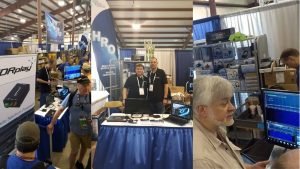
SDRplay at ML&S Summer Picnic
For those of you unable to make it to the ML&S Summer picnic, here’s the video of Andy presenting SDRplay and answering questions (the audio is a little quiet unfortunately)
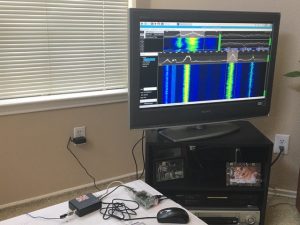
As well as giving this talk, Andy was demonstrating our new SD Card Image for the Raspberry Pi3 and how easy it is to run an RSP with it. Lots of interest around panadapters and using an RSP for chasing DX – many thanks to all who dropped by and to Martin Lynch and Sons for hosting another great event.
SDR Play
Posted by ML&S Martin Lynch & Sons on Samstag, 24. Juni 2017
New video guide – using a TM2 controller with SDRuno
The Tmate2 is a dedicated SDR controller that simply connects to your USB 2 port and enables you to control your SDR radio. The unit is fully programmable and comes with software. Even if your PC screen is switched to another program, the Tmate2 will allow you to operate your radio.
This is Number 17 in a series of videos from SDRplay https://youtu.be/yUm0qfurCaM
Radio Astronomy and SDRplay
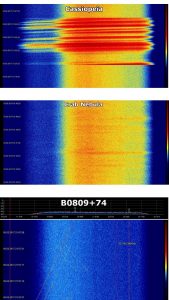
Some of you may have seen the RTL-SDR.com article titled “RECEIVING JUPITER NOISE BURSTS WITH AN SDRPLAY RSP1” see http://www.rtl-sdr.com/receiving-jupiter-noise-bursts-with-an-sdrplay-rsp1/
Maksym Losiev who made the Jupiter recording, wrote to us at SDRplay saying “For me, SDRPlay has become a new tool for researching radio waves from space. I have access to two radio telescopes: UTR-2 (https://goo.gl/PdekfH) and GURT (https://goo.gl/iHzTeV)
…here is a link to a more detailed article about these radio telescopes and their characteristics: https://goo.gl/KA76CE …”

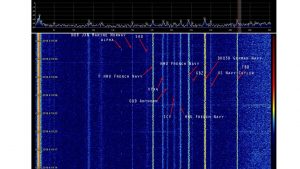
Maksym also writes that he also has a lot of SW and VLF observations using a miniwhip antenna

2 new SDRuno video guides added to the SDRplay YouTube Channel
We’ve just added a couple more video guides to the SDRplay YouTube Channel
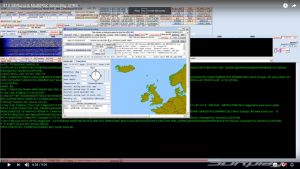
#15 in our series shows how to decode APRS using MultiPSK:
APRS – Automatic Packet recording System
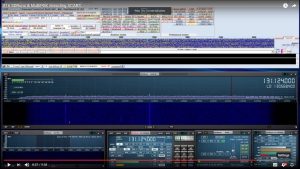
#16 in our series shows how to decode ACARS data using MultiPSK:
ACARS – Aircraft Communications Addressing and Reporting System
Raspberry Pi 3 image with SDR software pre-loaded for the RSP
We have released a Raspberry Pi 3 image that has a number of SDR applications pre-built and tested that support the RSP. Periodically, we will update the image with software updates and new software.
The current list of software included on the image is:
SoapySDR/SoapySDRPlay, SoapyRemote, ADS-B (dump1090), CubicSDR and SDR-J DAB receiver
Please note: This is a complete OS with software image. Writing the image to a micro SD card will wipe the micro SD card of any other data that is on there, so we recommend you make sure you have backed up any data on your existing micro SD card or you use a new micro SD card.
Instructions:
1. Download image. There are two downloads provided, the 7zip version is just a smaller download but not everyone has 7zip which is why we also provide a zip download. The links are here:
http://www.sdrplay.com/software/SDRplay_RPi3_V0.1.zip (2.7 GB)
http://www.sdrplay.com/software/SDRplay … 0.1.img.7z (2.0 GB)
2. Extract the contents of the compressed file. This will extract to a .img file which will be about 7.2 GB
3. Use an image writer such as Win32DiskImager (https://sourceforge.net/projects/win32diskimager) to put the image onto the micro SD card.
WARNING: Please make sure that you use the correct drive letter for the micro SD card. The image writing software will completely remove any data that is on the destination media.
That’s it – put the micro SD card into the Raspberry Pi 3 micro SD card slot and boot the system. Allow the system to fully boot and you will see a GUI that will allow you to run each of the applications or read further information.
We also recommend that you use an active cooling system on your Raspberry Pi 3 to avoid any issues with over heating. In our tests, we have used heatsinks and a fan in a case. The CPU speed will be throttled if the temperature gets too hot, so for optimum use this is really recommended. These cases are available at reasonable prices from many Raspberry Pi stores.
If you are a developer of software that supports the RSP and you would like to be included on the image that we will release periodically, please contact us at software@sdrplay.com – currently we’re aiming to update the image every quarter, this will largely depend on software availability and what the demand is.
We are aware of other software that we are looking to get onto the next release such as Pothos and more SDR-J software. We will work with developers on any issues we’ve seen during this process so that we can get them onto future images.
Click here to see a video on how easy it is to set up
SDR Console V3 Preview update released
Simon Brown’s popular SDR Console V3 beta software has been updated – his June 16th updated can be downloaded from http://sdr-radio.com/v3_help
A simple home made High Pass Filter design for filtering powerful AM interferers
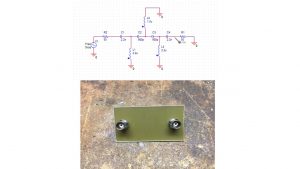
This High Pass Filter design by Mark Gluch is very effective – see 2017jun10_HF_HPF – he writes that it solved overloading caused by very powerful local AM broadcast transmitters. His other issue is sometimes high HF noise level from power lines or when certain lights or appliances are turned on. The filter was built using ordinary axial lead inductors and leaded ceramic capacitors on a piece of FR4 pcb material. Using BNC connectors in-out.
Step-by-step install guide for the RSP2 under Ubuntu 16.04
Kevin, KB9RLW has written a step-by-step install guide for the RSP2 under Ubuntu 16.04 and other debian based linux – his blog is on http://kb9rlw.blogspot.com/2017/06/step-by-step-install-of-sdrplay-rsp2.html – he’s also made a very nice video which you can see on https://youtu.be/V8lb3FGpSCA