We have released v1.41.1 of SDRuno
You can see the full set of changes to SDRuno 1.41.1 here: https://www.sdrplay.com/…/SDRplay_SDRuno_Release_Notes.pdf
I’d like to say a big thank you to all the moderators out there who maintain and help SDRplay users on the various groups and forums around the world.
The first to get going back in 2015, was the SDRplay Facebook Group which now has over 17,000 members. A huge tribute to Paul Jones the co-founder of the group and someone who, despite a demanding day-job has patiently nurtured the group year by year. He has also had to care for his wife who has been very unwell over recent years. Then there’s Rick King, who has suffered health issues, yet has tirelessly maintained the Independent SDRplay Users forum over the last couple of years.
During the pandemic lock-down era, we have seen Ruben Duckworth set up and manage the newer SDRplay groups.io forum, which recently passed the 1000 members mark – and then he and his wife went down with Covid 19. It was a harrowing experience and we are glad that he came though OK.
In France, Claude Commaret not only manages the French Facebook Group but he also translated and maintains the SDRuno manual in French! There are many others out there making sure that there are friendly places for people to meet virtually as the explore the wonders of SDR.
A full list of the forums we know about are listed here: https://www.sdrplay.com/communitylinks/
Of course even the moderators couldn’t do what they’re doing without all the contributors who continue to help the community with their detailed advice and help across the spectrum (sic!)
Thank You All – and to our cousins in the USA – Happy Thanksgiving!
In this video, John Fallows, VE6EY, author of the popular “Making it up” blog, shows HF diversity tuning in action with excellent results. He compares the performance of the low cost SDRplay RSPduo dual-tuner SDR receiver very favourably with the highly acclaimed Apache Labs Anan 7000 DLE MkII SDR.
In this demonstration he uses two active loop antennas separated by approximated 100 feet (30 metres) as he receives a weak 25m band broadcast signal over a 13,000 km path.
Update later on October 23rd: Just after I posted this, John published his blog describing all this in detail: https://play.fallows.ca/wp/radio/software-defined-radio/anan-versus-rspduo-on-hf-surprising-results/
There’s also a great audio interview with John being interviewed on Hamradio Workbench Podcast. John describes Diversity reception and how he sets up his antennas. He covers the difference between array gain, diversity gain and phase diversity. Start listening one hour and thirteen minutes into the podcast here: https://www.hamradioworkbench.com/podcast/hrwb-140-diversity-reception
(Starting at one hour 41 minutes and 45 seconds in to the podcast, John talks about how well the RSPduo and SDRuno do diversity 😉 )
Another great video posted in November: Take a look at this excellent RSPduo demo over on the Italian SDRplay Facebook group – it shows how you can select between 2 HF stations transmitting on exactly the same frequency by adjusting the phase setting: https://www.facebook.com/100001379902566/videos/1209143166582349/
It’s been over a month since SDRuno V1.41 was released. Overall the feedback has been very positive with lots of enthusiastic feedback about the new recording scheduler in particular.
We’d like to say a big thank you to those of you who have sent feedback concerning one or two issues you have discovered. This has been very helpful and the software team is working on potential fixes.
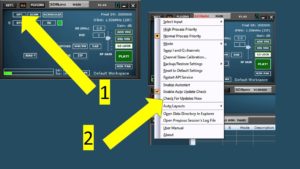
If you haven’t tried the latest version, you can launch your current version and click on the “OPT” button in the main panel. Then choose “Check for updates now” as shown below:

The SDRuno manual has been updated to detail the new recording scheduler. You can read all about it starting on page 24 : https://www.sdrplay.com/docs/SDRplay_SDRuno_User_Manual.pdf
Our thanks also to Claude Commeret for his translation Francais
As well as our home page with links straight to the most popular resources, remember also to check out all the other useful stuff we have on: https://www.sdrplay.com/misc/
(The index of SDRplay community links being one of these: https://www.sdrplay.com/communitylinks/ )
Many thanks to those who participated in our Zoom workshop yesterday which was aimed primarily at beginners but also strayed into some more complex questions too. It was good because with all the lockdowns of the past 18 months, the SDRplay team rely on this kind of contact to see where we need to focus future support and making it easier to find information.
Here are some of the questions which were asked and some links to resources which help answer them.
How do you use the new scheduler to record live (not scheduled)? See Page 24 of the manual (click on record): https://www.sdrplay.com/docs/SDRplay_SDRuno_User_Manual.pdf There’s a video guide to this 9 minutes 50 seconds into this video: https://youtu.be/oCsDY-0QrFE
Are there step by step startup instructions for SDRuno ? See page 123 of the manual for the “Quick Start Guide”. There’s also a simple intro video here: https://youtu.be/k8p106BpSXU
I just purchased an RSPduo. The main focus for me is MW and Low bands DXing. Can SDRuno record full day of MW and display the whole day waterfall like in Jaguar software for Perseus? I would love to have this feature. Yes but it needs a very large amount of memory storage. Here’s the link to the video showing examples of file sizes per minute of recording (fast forward to 7 minutes 25 seconds in): https://youtu.be/hUYTVZpNLNQ
Could you please explain in simple terms the difference between Zif and Lif and when to use each one? The simple answer is to use Low IF for 2MHz bandwidth and below. You will only need to use Zero IF when wanting to see more than 2MHz spectrum. The preset band buttons for HF and below all use Low IF.
Can you explain VFO and QRM? VFO stands for Variable Frequency Oscillator and was effectively the tuning dial of a traditional hardware radio. Thus it means the frequency you wish to tune to. QRM is a Ham radio shorthand for “interference” – usually man made (as opposed to “QRN” which is atmospheric – see https://en.wikipedia.org/wiki/Q_code
Can SDRPlay display the MW waterfall for the entire day all in one? Very useful for propagation conditions at-a-glance, helps in stations identification, etc. MW DXers do record the entire days then gets them reviewed later for small openings of rare stations, etc.: We have no experience of doing this, but here’s a link to forum discussion on the topic: https://www.reddit.com/r/RTLSDR/comments/3b1ulq/is_there_a_way_to_record_just_the_waterfall/
With the new ADSB plugin can it pass data to tracking site to link ADSB data with ATC data? Yes but you would need to create your own interface. This is something we are actively encouraging plugin developers to do, building on the ADSB plugin we provide.
I ran the update of SDRuno, and then the plugins did not work as they should – then I reinstalled the latest version and now it works – is this a known error? In general you should never need to do a reinstall. It is important to keep community plugins in a separate folder: See 2 minutes 22 seconds into this video guide to plugins: https://youtu.be/fZT5EODa9K4
What is the advantage of having 14bit ADC vs the cheaper 8bit ADC dongles? The increased dynamic range – examples of absolute performance measurements are published here https://www.sdrplay.com/wp-content/uploads/2018/01/RSP1A-Technical-Information-R1P1.pdf )
Is there a setup for the RSP 1 or 2 that will allow me to clearly see the individual 120 Hz spikes caused by genuine power line interference sources. I find that both RSP versions I have DO NOT display these spikes well. Try adjusting the Resolution Bandwidth (RBW) settings as per page 49 of the manual: https://www.sdrplay.com/docs/SDRplay_SDRuno_User_Manual.pdf
I have an RSPDx and did not succeed to run any of Jan’s plugins for decoding digital modes, i.e. CW, SSTV, NAVTEX and so on. All of them return an error upon plugin loading: dll not recognized. Can you help ? We recommend contacting Jan via his github pages: https://groups.io/g/SDRPlayUsers/message/2998?
Any tips on how to use the scheduler for MW DXing? : For using the scheduler and profiles for MW DXing please review this video: https://youtu.be/fURaBmYcPbg
Where can I learn about the SDRplay spectrum analyser software? Follow the link on https://www.sdrplay.com/misc/
(Please note that https://www.sdrplay.com/misc/ has links to many powerful resources including the ever growing SDRplay user community (Community Links, the Documentation and Vdeo catalogue, Mike KD2KOG’s HamGuides channel, Plugins, Antenna suggestions and links to these Webinars and workshops)
Any chance of an ARCAS decoder plugin? Hopefully in time, meanwhile here’s our guide: https://www.sdrplay.com/resources/decoding_lband.pdf
Any plans on having a more platform-independent version of this software (and the Spectrum Analyzer software) using Qt or other means for MacOS or Linux? We have recently accelerated development efforts on SDRuno V2.0 which will provide cross platform support – here’s our roadmap summary: https://www.sdrplay.com/sdruno-roadmap/ although we don’t commit dates on when this will be released. Meanwhile, SDR++ offers support cross platform and works with SDRplay RSPs: https://github.com/AlexandreRouma/SDRPlusPlus
Here’s the link to the workshop: https://youtu.be/xArq7lv6FWM
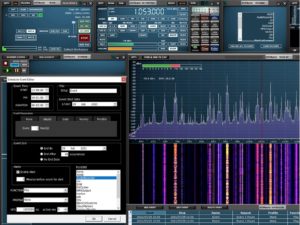
SDRuno V1.41 was fully released today. It includes the much requested full scheduler facility which allows you to set up numerous recording events for your RSP. As well as providing all the expected calendar options (time of day, date, start and stop times, repeating options and so on), you can also set the ‘profile’ for each recording – this allows you to pre-set frequencies, bandwidths, demodulator options (AM/FM/USB/LSB etc.), choice of filters and antenna port selection. Additionally you can choose the settings for connectivity to other third party software or the running of a specific plugin.
Added
• New Scheduler panel which replaces the old “Recorder” panel (launch using the SCHEDULER button in the main panel).
• A new autolayout to include the scheduler (for screen resolutions of 1920×1080 and above).
• Backup and Restore of the ini file settings (access via the main panel OPT menu)
• Screenshot button has been added to the SP1 title bar
• IQ wav files can now be used in plugins
Changed
• Autolayouts now take account of the taskbar location and size.
• Autolayouts have been improved to take account of higher resolutions.
• Saved workspace notification moved to the status bar.
• Memory Panel will now prompt to save any changes made when switching to another memory
bank.
Fixed
• Decimation and the LOLOCK state are now correctly saved and recalled within a profile.
• Main panel version tooltip now displays correct information.
• The step size could be set incorrectly when using non-FM modes and pressing any of the FM sub
mode buttons.
• ADS-B/DAB mode now handles when in both band-framed mode and also when the LO is locked.
• Bugs associated with wav file playback
• When loading a profile, the last used memory bank field will update correctly
• Saving a profile will now update the displayed loaded profile field correctly
Known Issues
• SP2 CWAFC drift issue (Zoom/window size/freq display)
• IF output mode disabled SP1 spectrum mouse clicks
• Occasionally if SDRuno is closed whilst a plugin is still running, it may not close properly. This may
necessitate a PC reboot to fix it.
You can find this latest version of SDRuno on our downloads system :https://www.sdrplay.com/downloads
Also available with SDRuno V1.41 is a new ADSB plugin which simplifies the way you can use an SDRplay RSP for decoding real time transponder signals from aircraft in your vicinity. You simply ensure you have a suitable antenna for 1.090 GHz and launch SDRuno and the new ADSB plugin. This new Plugin works with freely available Virtual Radar Server software which collects the data from the SDRuno plugin and produces a clickable map that shows all the aircraft found in real time. Anyone who has an RSPduo (the dual tuner SDR) can simultaneously listen to the corresponding ATC voice channel to monitor the pilot interaction with air traffic control. Mike, KD2KOG from SDRplay has produced a video and a comprehensive app note covering this and the many ways this new plugin can be used to customise displays via its internal ADSB web server: https://youtu.be/CtcS9OstHJI
The documentation can be found here: https://www.sdrplay.com/docs/ADSBpluginBeta.pdf
December 2021 update – Please note that for licensing reasons in version 1.41.1 (December 2021 onwards) the ADSB plugin is no longer included in the SDRuno download. Instead you can get the plugin installer by going to: https://github.com/…/SDRuno_ADSB_Plug…
Another great plugin improvement is the squelch activated record facility in the audio recorder plugin. This allows recording of only the active signals which break through the sqelch theshold setting. There’s another new video which demonstrates this: https://youtu.be/WB8GctTka0M
Finally, please note that we have also updated the SDRuno roadmap. You’ll see that we have changed the order in which we are doing things to bring forward the release of V2.0 – you can see the roadmap here: https://www.sdrplay.com/sdruno-roadmap
SDRuno 1.41 open beta 2 has been released https://www.sdrplay.com/sdruno-beta
As before please read all the information on the page. This is likely to be the last open beta before full release, so please report any bugs found via email and NOT through the ticket system.
Mike Harwood has made a new video comparing 4 different active mag loop antenna at various frequencies from LF up to 52MHz using two SDRplay RSPduos which allowed simultaneous spectrum snapshots of the 4 loops in action with real signals. These are loops from Bonito, Cross Country Wireless, LZ1AQ and Wellbrook.
.All four loop antennas performed well. None of the loops had a significant failing. Some of the summary points are listed below:
Possibly the Wellbrook ALA1530N and the LZ1AQ were slightly better performers, but this is a marginal viewpoint.
However cost and ease of set-up are key deciding factors
The Wellbrook and Bonito loops come fully assembled and ready to use.
The Cross Country Wireless LAA++ loop comes with an assembled mast amplifier and a wire loop, so a rigid loop assembly would need to be constructed by the user. The bias-T does not come in a case, so this would need constructing and the user needs to provide a power supply. None of these are difficult tasks.
The LZ1AQ has many modes and a separate box with switches need to be assembled to make full use of these. As with the CCW, the bias-T does not come in a case, and a power supply needs providing. This is the more difficult loop of the four to get working.
Cost – the Cross Country Wireless LAA++ and the LZ1AQ are by far the lower-cost options.
This is the second of Mike’s antenna comparison videos.
Here’s a link to the introduction to the series: https://youtu.be/yuG47e8hHTQ All 4 antennas shown here are highly recommended for use with the SDRplay RSP family of SDR receivers. Mike Harwood is prioritising this activity around popular loop designers/companies who recommend our SDRs – that way both suppliers are on the same page when it comes to providing follow-up support to anyone following our recommendations for an SDR receiver plus antenna combination. Mike encourages you to add your comments to the YouTube video – they will help shape future videos. The MLA 30+ will be featured in the next video.

The RSP1A is proving popular for after school classes and clubs as a way of creating an exiting way to discover radio.
Go to https://www.sdrplay.com/educators/ to contact us about hardware discounts for schools, colleges and universities (fill in the contact form)
At university level, the SDRplay sponsored 11-hour teaching module “Understanding Radio Communications – using SDRs” created by Sapienza, University of Rome has been updated to include improvements and additional materials. there is also a version of the teaching materials available in Italian.
Go to https://www.sdrplay.com/understandingradio/ and find out more about the university course and to register to download the free teaching materials
We have just released an open beta version of SDRuno V1.41 to a limited number of people and are now working through the final bugs which are surfacing….. it won’t be long till the official release will be made (days now, not weeks!).
We are planning a webinar on YouTube for Sunday August 15th at 1700 UTC to talk through what’s new in V1.41 and to take questions via chat. Here is the link: https://youtu.be/kuEPIdN2nnQ
Meanwhile here’s a video summary of the new features you can expect in SDRuno Version 1.41:
For those who like to explore other software (SDR Console ,HDSDR and CubicSDR being ongoing favourites) , there has been a flurry of third party software authors adding support for SDRplay RSPs. Even though we can’t help users with these other software products, behind the scenes we are trying to support the authors when they have questions. Special thanks in the last few weeks to Kevin Loughin for his YouTube videos and Alan Hopper who has made a beta release of his SparkSDR software for Hermes transceivers work for the RSP family. Similarly we thank Alexandre Rouma for his work on SDR++ which now supports RSPs. These are great initiatives and these guys have spent a lot of time working on including our RSPs. Please be patient with them and help them iron out any problems you see. The fact that these new examples support potentially Linux environments will be appreciated I’m sure – having said that, our work on migrating SDRuno to non-windows platforms is still progressing. All the code developed for V1.41 is compatible for the V2.0 migration to which we remain committed, even though we cannot commit to a timescale.
Along with many other electronics vendors, we are experiencing glitches with our semiconductor supply chain and working hard to mitigate this so that our production delays can be minimised. Some of our resellers may temporarily be awaiting new stocks. Again, we ask for patience if availability becomes a problem in the coming weeks.
Wishing all our (northern hemisphere!) customers a great summer.