

Read the SDRplay RSP2 review by Mike Richards, courtesy RSGB

Here is the latest RSP2 review, written by Mike Richards for the April edition of the RSGB monthly RadCom magazine:
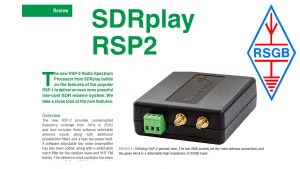
Here is the latest RSP2 review, written by Mike Richards for the April edition of the RSGB monthly RadCom magazine:
We are pleased to announce that Mike Ladd has joined SDRplay in a technical marketing role. Mike is highly respected for his SDR knowledge and, until recently, he co-chaired the independent SDRplay Users Facebook group – https://www.facebook.com/groups/sdrplay/ which has grown to over 5000 members. We are confident he’ll continue to help make SDRplay products great for the SDR user community. Welcome Mike.
The cost of wirelessly connecting IoT devices continues to fall rapidly thanks to the fact that Moore’s Law is still just about alive and well. This means integrating more and more smart sensors to some form of low bit-rate wireless connectivity as offered by the likes of Sigfox, Weightless or LoRaWAN technologies continues to be a popular quest. This in turn means new and interesting challenges for network developers and OEMs. Network coverage, especially where ‘fire and forget’ or ‘best endeavor’ techniques are used, becomes increasingly important.
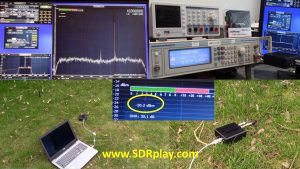
Thus the availability of low cost and reasonably accurate RF power measurement equipment is needed in the field, to allow remote monitoring prior to full deployment. As well as designing reliable antenna and transmission systems, there is also the need to analyze and indeed identify sources of interference within the spectrum allocated for the operation of such IoT networks. On both these fronts the RSP2 works very well as demonstrated in this video:
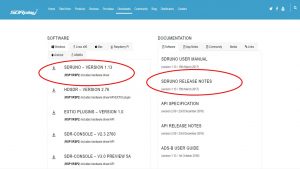
We have just released SDRuno version 1.13 which adds the much requested ‘IF Out’ facility for Panadapter use. It also includes the following updates:
Bug Fixes
• Fixed RSP2 IF AGC/gain slider display issues
Updates
• Added IF Output mode for transceivers
• Added 250 Hz to frequency step size list
• Default page in the settings panels is now the left most page each time SDRuno is started
• Added RSP2 IF GR/Gain value
• Added Factory Reset in the Main Window OPT menu (1st Instance only)
• Improved power function error handling
• Added support for Sub Modes, Filter BW and Port Selction in the Memory Panel
• Changed RDS window colour scheme to match other windows
• Added new hotkeys ‘v’, ‘-‘ and ‘+’ which are for VFO, Out and In zoom buttons in the SP1 window
• Hotkey ‘b’ now opens AND closes the memory panel
• Changed the default sync Rig->VRX setting to true
• API – RefClk o/p no longer stops when the master RSP2 stops streaming
To get this latest version, go to http://www.sdrplay.com/downloads
(Documentation is in ‘release notes’)
There’s a lot going on behind the scenes here at SDRplay as we get close to another SDRuno software update release which will support ‘IF out’ Panadapter applications. There are quite a number of other improvements and bug fixes included. We have also been in touch with some of the leading satellite imaging decoder developers to ensure the full capabilities of the RSP2 can be exploited – more on that in the near future although there are already some nice pictures emerging such as in this tweet from Joe at @USA-SATCOM showing sunny California skies on Sunday morning.

After a rush on RSP2pros in February, we have now restocked most of our distributors. We are making plans to join Ham Radio Outlet at the Dayton Hamvention in May and look forward to meeting a lot of people there.
Finally a big thank you to the numerous 3rd part s/w developers out there who increasingly take time to make sure their software works with the RSP1 and RSP2. (often this just requires the use of our EXTIOfile – the 3rd item down on our Windows Downloads page or in the linux world, increasing use of SoapySDR – compatible flows – – https://github.com/pothosware/SoapySDR/wiki
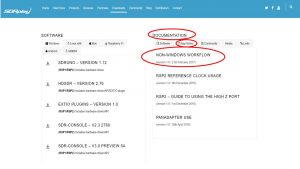
We have released a document called ‘Non-Windows Work Flow’ to assist non Windows users. The document details the recommended flow for getting started with the RSPs in a non-Windows environment. Note that different flavours of non-Windows platforms may have specific issues or requirements. The document is based on the Ubuntu platform and is intended as a generic and living document which will be updated regularly. Our forum on http://www.sdrplay.com/community/ is another growing resource for non-windows users as well – you can use the ‘search’ facility to look for specific posts relevant to what you might be trying to do.
You can download the Non-Windows Work Flow document under the ‘Apps notes’ tab on http://www.sdrplay.com/downloads/ or click on the picture below:
HRO have sold out of RSP2pro receivers in the USA. (March 4th update – shipments are currently at London Heathrow airport – so by March 7th, there should be availability in HRO stores again)
Other distributors around the world have also run out or are running low. (March 4th update – shipments are currently at London Heathrow airport – so by early next week, there should be better local availability) – click here for our list of SDRplay distributors: http://www.sdrplay.com/distributors/ (Please note that in the case of RS Components, just Google ‘RS 125-7958‘ where 125-7958 is the product code and it will take you to RS Components order page for your country )
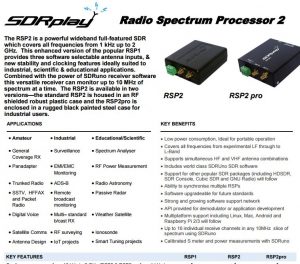
The only difference between the RSP2 and the RSP2pro, is that the RSP2pro is housed in a heavy steel case whereas the RSP2 has internal metallic screening within its rugged plastic case.
Click here for the RSP2 and RSP2pro datasheet :
Here’s a very nice YouTube video where AA4OO shows how an SDR can be used with a receive antenna as a panadapter with older transceivers. This demo uses an RSP1 and also discusses protection techniques for the Receiver including the kit available from OK1RP.
Our brief introduction to Panadapters can be found here: http://www.sdrplay.com/Panadapterintro1.pdf
We would like to send our sympathy to the family and friends of Dave Powis G4HUP, whose Panadapter Tap Kits were used widely. You can see his obituary here: http://rsgb.org/main/blog/news/silent-keys/2017/02/13/dave-powis-g4hup-9th-february-2016/ – the future of his company is unknown but as we get news, we will post it on our blog.
Both V2.3 and V3 of SDR Console have had updates within the last day or so. Both versions now support both the SDRplay RSP1 and RSP2. This means remote access for the RSP2 is now possible with SDR-Console. We have built new packages which are available on both the ‘Downloads’ page and the ‘Start-here’ pages of www.sdrplay.com . For more on SDR Console remote access – take a look at http://www.sdrspace.com/Version-2 – many thanks to Simon Brown for his support.
We have recently added some additional support resources to our SDRplay team, and we have introduced a new ticketing system which should make sure we respond directly to you if you have need of help. Simply go to our contact page on http://www.sdrplay.com/contact/ and click where it says “Click here to complete a form to communicate with us”. (Up till now we have relied on several people manually double checking the emails which came in to our ‘support’ email address – it worked pretty well, but occasionally we dropped the ball)
If your problems are to do with particular applications ,antennas, techniques and so on, then the real experts are most likely among the SDRplay community. Here we recommend posting your question on our community forum http://www.sdrplay.com/community/ or better still on one of the many dedicated Facebook groups (simply search under www.facebook.com/groups for ‘SDRplay’ or ‘SDRuno’ or ‘HDSDR’ or ‘SDR Console’ where there are many thousands of RSP users out there – we encourage you to join the groups because the chances are someone can provide expert advice on the very specific nature of your question, better than we can at SDRplay. Even if you don’t like posting on Facebook, you can search the discussions there for excellent suggestions to questions posted by others!
One very frequent question is ‘I’ve been given an RSP as a present, and don’t know where to start’…….
The best way to get started is to pick one of the 3 most popular SDR software options and to then use the Start-Here process on http://www.sdrplay.com/start-here/
The Start here process will guide you to the necessary download for whichever software you choose to use (e.g. our own ‘SDRuno’ or ‘HDSDR’ or ‘SDR Console’…. each has different pros and cons with HDSDR probably the simplest for the newcomer to SDR radios, and SDRuno is our own, so it is 100% under our control)
Using the ‘Start Here‘ process will get you to the right ‘download’ and in the event you come unstuck, will log your combination of choices, should you need support from us.
For SDRuno, then as well as the manual on the downloads page of http://www.sdrplay.com, and the ‘cookbook’ guide on https://www.nn4f.com/SDRuno-cookbook.pdf , the following videos are also useful:
https://youtu.be/xBGHB0oMXHU (SDRuno video guide for the RSP1)
https://youtu.be/92Ijh_NAEfc (SDRunovideo guide for the RSP2)
https://youtu.be/YAtT97Ash8E (about the different antenna RSP2 ports)
There are a growing number of SDRplay related videos linked in the playlists section of our YouTube Video channel