We have released v1.41.1 of SDRuno
You can see the full set of changes to SDRuno 1.41.1 here: https://www.sdrplay.com/…/SDRplay_SDRuno_Release_Notes.pdf
In this video, YouTuber Tech Minds shows how the new multiplatform SDR++ software supports the RSP-specific features. In this example he shows how to access broadcast notch filters, bandwidth options, antenna ports and more, using an RSPdx:
To use SDR++ with an RSP, if you don’t already use RSP-specific software, make sure you first download the SDRplay API by going to https://www.sdrplay.com/softwarehome/ and selecting your device type and operating system. Then choose “API”
Full SDR++ documentation can be found on author, Alexandra Rouma’s github page: https://github.com/AlexandreRouma/SDRPlusPlus
We are very aware of Linux and Mac users awaiting SDRuno V2.0 – the updated roadmap accelerates efforts on this, with V2.0 being just 2 releases from now: https://www.sdrplay.com/sdruno-roadmap/https://www.sdrplay.com/sdruno-roadmap/
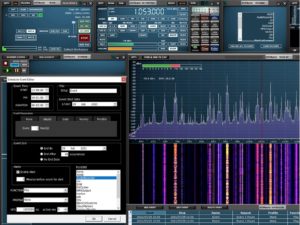
SDRuno V1.41 was fully released today. It includes the much requested full scheduler facility which allows you to set up numerous recording events for your RSP. As well as providing all the expected calendar options (time of day, date, start and stop times, repeating options and so on), you can also set the ‘profile’ for each recording – this allows you to pre-set frequencies, bandwidths, demodulator options (AM/FM/USB/LSB etc.), choice of filters and antenna port selection. Additionally you can choose the settings for connectivity to other third party software or the running of a specific plugin.
Added
• New Scheduler panel which replaces the old “Recorder” panel (launch using the SCHEDULER button in the main panel).
• A new autolayout to include the scheduler (for screen resolutions of 1920×1080 and above).
• Backup and Restore of the ini file settings (access via the main panel OPT menu)
• Screenshot button has been added to the SP1 title bar
• IQ wav files can now be used in plugins
Changed
• Autolayouts now take account of the taskbar location and size.
• Autolayouts have been improved to take account of higher resolutions.
• Saved workspace notification moved to the status bar.
• Memory Panel will now prompt to save any changes made when switching to another memory
bank.
Fixed
• Decimation and the LOLOCK state are now correctly saved and recalled within a profile.
• Main panel version tooltip now displays correct information.
• The step size could be set incorrectly when using non-FM modes and pressing any of the FM sub
mode buttons.
• ADS-B/DAB mode now handles when in both band-framed mode and also when the LO is locked.
• Bugs associated with wav file playback
• When loading a profile, the last used memory bank field will update correctly
• Saving a profile will now update the displayed loaded profile field correctly
Known Issues
• SP2 CWAFC drift issue (Zoom/window size/freq display)
• IF output mode disabled SP1 spectrum mouse clicks
• Occasionally if SDRuno is closed whilst a plugin is still running, it may not close properly. This may
necessitate a PC reboot to fix it.
You can find this latest version of SDRuno on our downloads system :https://www.sdrplay.com/downloads
Also available with SDRuno V1.41 is a new ADSB plugin which simplifies the way you can use an SDRplay RSP for decoding real time transponder signals from aircraft in your vicinity. You simply ensure you have a suitable antenna for 1.090 GHz and launch SDRuno and the new ADSB plugin. This new Plugin works with freely available Virtual Radar Server software which collects the data from the SDRuno plugin and produces a clickable map that shows all the aircraft found in real time. Anyone who has an RSPduo (the dual tuner SDR) can simultaneously listen to the corresponding ATC voice channel to monitor the pilot interaction with air traffic control. Mike, KD2KOG from SDRplay has produced a video and a comprehensive app note covering this and the many ways this new plugin can be used to customise displays via its internal ADSB web server: https://youtu.be/CtcS9OstHJI
The documentation can be found here: https://www.sdrplay.com/docs/ADSBpluginBeta.pdf
December 2021 update – Please note that for licensing reasons in version 1.41.1 (December 2021 onwards) the ADSB plugin is no longer included in the SDRuno download. Instead you can get the plugin installer by going to: https://github.com/…/SDRuno_ADSB_Plug…
Another great plugin improvement is the squelch activated record facility in the audio recorder plugin. This allows recording of only the active signals which break through the sqelch theshold setting. There’s another new video which demonstrates this: https://youtu.be/WB8GctTka0M
Finally, please note that we have also updated the SDRuno roadmap. You’ll see that we have changed the order in which we are doing things to bring forward the release of V2.0 – you can see the roadmap here: https://www.sdrplay.com/sdruno-roadmap
SDRuno 1.41 open beta 2 has been released https://www.sdrplay.com/sdruno-beta
As before please read all the information on the page. This is likely to be the last open beta before full release, so please report any bugs found via email and NOT through the ticket system.
We have just released an open beta version of SDRuno V1.41 to a limited number of people and are now working through the final bugs which are surfacing….. it won’t be long till the official release will be made (days now, not weeks!).
We are planning a webinar on YouTube for Sunday August 15th at 1700 UTC to talk through what’s new in V1.41 and to take questions via chat. Here is the link: https://youtu.be/kuEPIdN2nnQ
Meanwhile here’s a video summary of the new features you can expect in SDRuno Version 1.41:
For those who like to explore other software (SDR Console ,HDSDR and CubicSDR being ongoing favourites) , there has been a flurry of third party software authors adding support for SDRplay RSPs. Even though we can’t help users with these other software products, behind the scenes we are trying to support the authors when they have questions. Special thanks in the last few weeks to Kevin Loughin for his YouTube videos and Alan Hopper who has made a beta release of his SparkSDR software for Hermes transceivers work for the RSP family. Similarly we thank Alexandre Rouma for his work on SDR++ which now supports RSPs. These are great initiatives and these guys have spent a lot of time working on including our RSPs. Please be patient with them and help them iron out any problems you see. The fact that these new examples support potentially Linux environments will be appreciated I’m sure – having said that, our work on migrating SDRuno to non-windows platforms is still progressing. All the code developed for V1.41 is compatible for the V2.0 migration to which we remain committed, even though we cannot commit to a timescale.
Along with many other electronics vendors, we are experiencing glitches with our semiconductor supply chain and working hard to mitigate this so that our production delays can be minimised. Some of our resellers may temporarily be awaiting new stocks. Again, we ask for patience if availability becomes a problem in the coming weeks.
Wishing all our (northern hemisphere!) customers a great summer.
Updated Sat 26th June with links to presentation material:
Jon and Andy from SDRplay are spending time this weekend at Ham Radio World ( a virtual replica of the annual Friedrichshafen event) which runs from June 25th to June 27th 2021. As in previous live events, we are pleased to be the guests of Funk24 and are spending a lot of time in their booth. We are also visiting booths of other authorised suppliers who are participating. Join Jon first thing Sunday at the Bonito booth. Click here to join the fun: https://en.ham.darc.de/
The interactive format of the event means that anyone should be able to approach either Jon or Andy and ask questions ( Jon is called “SDRplayJ” and Andy is called “SDRplayA” – so feel free to approach us.
Updated Sat 26th June: On Saturday at 14:00 CEST (12:00 UTC) Jon and Andy presented an update and answered questions, in virtual conference room Lichtenstein – many thanks to the many people who came along
We always appreciate meeting existing customers and learning about what you’re doing with your RSP.
Here are some links to the materials we shared:
Click here to download a copy of the slides we showed
Click here to view the SDRuno video we showed: https://youtu.be/oCsDY-0QrFE
Here’s a link to the Raspberry Pi image page we mentioned: https://www.sdrplay.com/raspberry-pi-images/
Here’s a link to the documentation/video catalogue: https://www.sdrplay.com/apps-catalogue/
Cross Country Wireless have announced two new versions of a receiver front end protection unit to protect sensitive VLF/HF or VHF receivers from high levels of RF from other stations on the same site or large antenna arrays.
It is particularly suitable for multi-station contest groups where receiver damage may occur from high power stations operating in the same frequency band. It is especially suitable for SDRplay RSP owners wanting to run receivers 24/7 unattended as the protection unit will divert electrostatic charges and near lightning surges to ground.

How does it work?
The protection unit has three levels of protection against over-power damage, electrostatic charge on the antenna and nearby lightning surges.
A gas discharge tube rated to take nearby lightning surges of 10 kA is connected across the input socket. An isolation transformer connects between the two sockets. This isolates the output socket from any electrostatic charges on the input socket. If the unit is used as the sole protection device for a receiver we recommend that the M6 terminal and wing nut is connected to a good earth or ground connection so that excess energy can safely flow to ground.
The isolation transformer is designed to saturate with very high RF power levels so that a cascaded diode limiter can limit the output power to a safe level.
The multiple levels of protection are such that if the output of a 150W transmitter is inadvertently applied to the protection unit input it will still protect the receiver.
The latest version (June 2021) now limits the maximum output signal to a level lower than the 10 dBm limit allowed by SDRplay receivers.
For more details, visit: http://www.crosscountrywireless.net/receiver_protection_unit.htm
We already knew about fake RSP1s and RSP1As but recently it seems some unfortunate customers have been tricked into buying other counterfeit devices. The counterfeiters are becoming more resourceful at marketing their fake products, ably assisted by Banggood, AliExpress and Walmart as illustrated in our traffic light warning picture below. eBay should also be coded red, but for the fact some trusted resellers sell via eBay as do respectable individuals who might want to sell their pre-loved RSP. Be careful with Amazon who have a mixture of genuine resellers and fake product sellers. They encourage the sale of Chinese fakes via “reliable” traders who mostly sell low cost trinkets in order to maintain 95% customer satisfaction ratings.
So this is just another reminder to everyone to be doubly sure of who they are dealing with, before buying from them. Here’s our latest guidance on the subject: https://www.sdrplay.com/fakealert/

Above: approach these markets as guided by the traffic light above
Safe shopping everyone!
SDRuno plugin authors have been busy adding enhancements and new plugins for SDRuno. Plugins allow the user to seamlessly access 3rd party software and enjoy exciting new capabilities.
Jan van Katwijk has written a basic Weather Fax plugin for SDRuno. It can be downloaded from: https://github.com/JvanKatwijk/SDRuno_weatherfax/tree/master/the-dll
It’s very simple to operate as you can see in this video: https://youtu.be/Cz4-8-vMasM
Introducing “CloudMarkers” – an SDRuno Community database for markers

Jo Schmidt has released his CloudMarkers plugin which is accesses a community maintained database for markers that you can show in the your spectrum display. Every CloudMarker plugin user can add new markers and edit existing ones. For each marker some additional information can be stored, so that you can see which station you are receiving when scrolling over the spectrum. Jo encourages you to have a look at it and give feedback and suggestions for improvements. You can always find the latest version of this plugin at http://markers.cloud Download the ZIP file and extract the DLL to your community-plugin folder
The CloudMarkers plugin is now included in the community plugin installer (v2.3) along with the updated version of Fran – https://www.sdrplay.com/downloads
Eddie Macdonald (author of the Contour Shuttle Plugin) has completed a screen reader accessibility plugin which will be tested in the coming days and has also been working on a very exciting “SDRuno Shortcuts” plugin…..watch this space!
The SDRplay website plugins information page is: https://www.sdrplay.com/plugins/ (Here you can find help and links to a video guide showing you how you can add and manage plugins for SDRuno)
You can find out the latest plugin news and links by going to : https://www.facebook.com/groups/sdrunoplugindeveloper
SDRplay is pleased to be supporting the upcoming QSO Today Virtual Ham Expo this weekend.
We have Dallas-based Steve, KI5ENW demonstrating the latest SDRuno release along with some of the newest plugins. Steve’s talk is on Sunday 14th March 2021 in the session starting at 0900PDT (1600UTC) – there will an opportunity to ask questions via an interactive Q&A session.
For more information on this event, and to register – go to: https://www.qsotodayhamexpo.com/
To view recordings of previous SDRplay presentations , demos and webinars – go to: https://www.sdrplay.com/webinars/